 SEOSEO Reporting and Rank Tracking: What UK Businesses Should MeasureWhat a useful SEO report includes, which metrics matter, how to use keyword rank checkers sensibly, and how AI search changes reporting.
Best SEO Tools: A Practical Toolkit for UK Businesses
The best SEO tools grouped by job, what free SEO checkers can and cannot tell you, and a simple toolkit for UK businesses of every size.

The best SEO tools for most UK businesses start with Google's own free tools: Search Console for what people search to find you, PageSpeed Insights for speed, and Google Trends for demand. Add a crawler to check your site for technical problems, a keyword research tool to find new topics, and a keyword rank checker if you need to track positions. Paid SEO software is worth it once you are working at scale, but no tool replaces a clear plan and someone to act on what it finds.
This guide groups SEO tools by the job they do, explains what free SEO checkers can and cannot tell you, and shows how to build a simple toolkit without overspending.
The best SEO tools, grouped by job
| Job | What the tool does | Free starting point |
|---|---|---|
| Search performance | Shows the searches, clicks and positions for your pages | Google Search Console, Bing Webmaster Tools |
| Site speed | Measures loading, responsiveness and layout stability | PageSpeed Insights |
| Website SEO checker | Crawls your site for broken links, missing titles, redirects and duplicates | Free versions of desktop crawlers, such as Screaming Frog's free limit |
| Keyword research | Finds related searches, questions and volumes | Google Keyword Planner, Google Trends, autocomplete |
| Keyword rank checker | Tracks your positions for chosen keywords over time | Search Console average position |
| Competitor and backlink analysis | Shows who links to you and to competitors, and what they rank for | Limited free plans of paid suites |
| Structured data | Checks markup for rich result eligibility | Google Rich Results Test |
Free SEO tools every UK business should use
Google Search Console
Search Console is the most useful free SEO tool because it uses Google's own data about your site. It shows which searches bring visitors, which pages are indexed, and which have problems. Check it monthly and set it up for every version of your site.
PageSpeed Insights
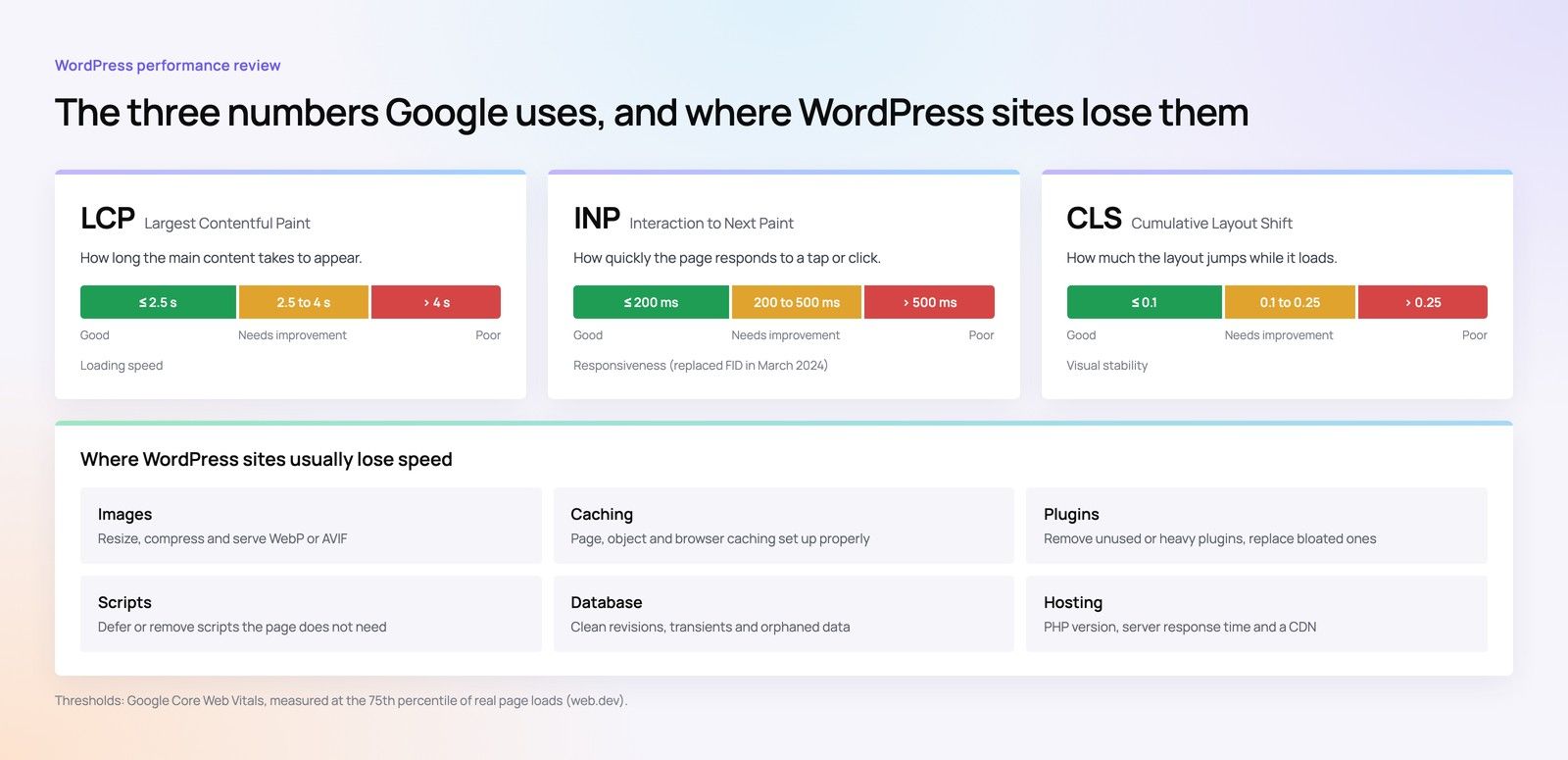
PageSpeed Insights tests a page and reports Core Web Vitals from real visitors where data is available, plus lab tests and suggestions. Test your home page, key service pages and a typical article on mobile.
Google Trends and Keyword Planner
Google Trends shows how interest in a topic changes over time and by region within the United Kingdom. Keyword Planner, free with a Google Ads account, suggests related searches and volume ranges. Together they cover most keyword research needs for a small business.
Rich Results Test
Google's Rich Results Test checks your structured data and shows which rich results a page may be eligible for. Use it after any template change.
Free SEO checker or full audit?
A free SEO checker or website ranking checker gives a quick score and a list of issues in seconds. That is useful for spotting obvious problems such as missing titles, broken links or slow pages. But automated checkers:
- Flag many minor issues with equal urgency.
- Cannot judge whether your content answers what customers search for.
- Do not know your business goals or competitors.
- Miss problems that need a human to spot, such as two pages competing for one search.
Use free checkers for regular health checks, and a full website audit or technical SEO review when you need a prioritised plan.
Paid SEO software: when it is worth it
Paid suites such as Semrush, Ahrefs and Moz combine keyword research, rank tracking, backlink analysis, site audits and competitor research. Many offer free trials or limited free plans. They are worth paying for when:
- You manage a large site or several sites.
- You need competitor and backlink data regularly.
- You track many keywords across several markets.
- An in house marketer or agency will use the data every week.
Each tool estimates search volume and difficulty differently, so treat their numbers as guides rather than facts, and compare them with your own Search Console data.
Keyword rank checkers: use them carefully
Rank tracking is useful for seeing trends, but positions vary by location, device and personalisation. A keyword can rank differently in Manchester and London, or on mobile and desktop. Track a focused list of keywords tied to your services, watch the trend over weeks rather than daily changes, and always judge success by clicks and enquiries rather than position alone.
A simple SEO toolkit by business size
| Business | Suggested toolkit |
|---|---|
| Small business | Search Console, Google Business Profile, PageSpeed Insights, Google Trends |
| Growing business | The above plus a desktop crawler and one paid suite for keywords and ranks |
| Online shop or large site | The above plus log analysis, scheduled crawls and structured data monitoring |
Tools only help if someone acts on them
The most common SEO problem is not a missing tool. It is a list of findings that never gets fixed. Decide who owns each fix, schedule developer time, and review results monthly. Our Core Web Vitals and web development teams turn tool findings into changes on your site.
How Codeeo helps
Codeeo has delivered over 200 projects across the UAE and the US, with a team of more than 80 people in Dubai, Riyadh and Karachi. Our SEO and digital marketing team uses these tools every day, then fixes what they find with our developers, so you get results rather than reports. To get started, contact our team.
Frequently asked questions
The best free SEO tools come from Google: Search Console for search performance and indexing, PageSpeed Insights for speed, Google Trends and Keyword Planner for keyword research, and the Rich Results Test for structured data. Add Bing Webmaster Tools and the free version of a desktop crawler to check your site for technical issues. Together they cover most needs of a small business.
Free SEO checkers are accurate for simple, measurable issues such as missing titles, broken links, redirect chains and slow pages.
They are less useful for judging content quality, search intent or which fixes matter most for your business. Use them for regular health checks, and rely on a human led audit when you need a prioritised plan linked to your goals and competitors.
Not at first.
Most small businesses can do a lot with Search Console, Google Trends, Keyword Planner and PageSpeed Insights. Paid SEO software becomes worth it when you manage large or multiple sites, need regular competitor and backlink data, or track many keywords across markets. Choose one suite, use it consistently, and compare its estimates with your own Search Console data.
Search Console shows your average position for the searches that already bring impressions.
For specific keywords, a keyword rank checker tracks positions over time. Searching yourself can mislead, because results vary with location, device and history. Track trends over several weeks rather than daily changes, and judge success by clicks and enquiries as well as position.
A website SEO checker crawls your pages and reports technical and on page issues: broken links, redirect chains, missing or duplicate titles and meta descriptions, missing headings, slow pages, images without alt text, and pages blocked from search engines. Some also check structured data and mobile usability. The results are a starting point that still needs prioritising against your business goals.
SEOSEO Reporting and Rank Tracking: What UK Businesses Should MeasureWhat a useful SEO report includes, which metrics matter, how to use keyword rank checkers sensibly, and how AI search changes reporting. SEOOff-Page SEO: Backlinks and E-E-A-T for UK BusinessesWhat backlinks are, how E-E-A-T works, safe ways to earn links in the UK, and how off-page SEO supports visibility in AI search.
 SEOOn-Page SEO in 2026: A Practical Checklist for UK WebsitesA practical on-page SEO checklist: titles, meta descriptions, headings, content, SERP features and how to check every page on your site.
Tell us what the business needs. We will tell you what to build first.
Schedule a free consultation and get a written recommendation, with costs, before you commit to anything.
Get in touchPROVEN RESULTS
4.7 / 5verified reviews on Google